

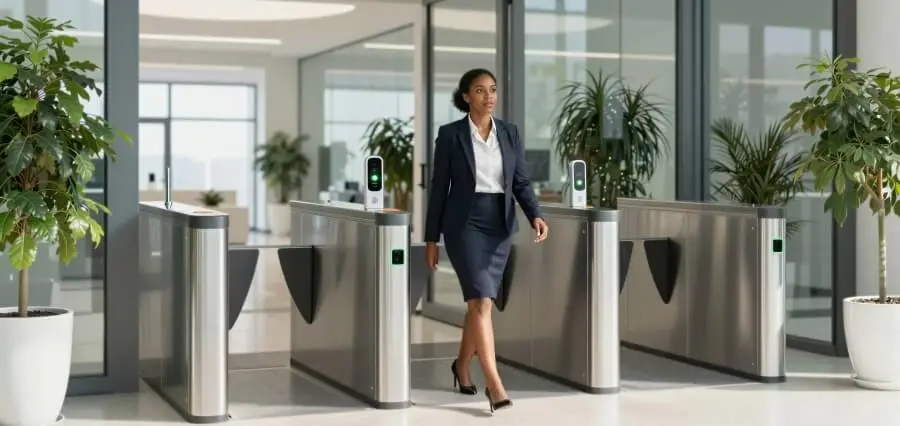


The lock on a commercial front door tells a story about the building. A brass key on a ring suggests a small, stable team. A badge reader beside the entrance implies staff turnover, shared spaces, or rules about who may enter which floors. Choosing among the available options is rarely a question of which technology is newest. It is a question of how many people come and go, how often that group changes, what the business must protect, and what regulators or insurers expect. This article compares keys, keypads, cards and fobs, RFID systems, and mobile credentials, then looks at the factors and cost structures that separate a good fit from an expensive mismatch.
Keys and Keypads: Simple, Familiar, and Limited
Mechanical keys remain common because they are cheap and require no power or network. For a small office with a handful of long-term employees, a good quality lock with a restricted keyway can serve well for years. The weaknesses appear as soon as the group grows. Keys can be copied freely at a hardware store unless the keyway is restricted; they leave no record of who entered, and a lost key forces a choice between living with the risk and rekeying every affected lock.
Rekeying costs add up quickly. Replacing cylinders across a building after a departing manager fails to return a key can cost more than a basic electronic system would have. Master key systems reduce carrying burdens yet concentrate risk, since a single lost master opens many doors.
Keypads address part of that problem. A staff member enters a code, and no physical object can be lost. Codes can be changed without replacing hardware, and some models allow unique codes per person. Still, codes are easily shared, observed over a shoulder, or remembered by former employees. Basic keypads typically keep little or no audit history, so a code used at midnight cannot be traced to anyone. They suit storage rooms, back offices, or low-risk doors better than primary entrances for larger organizations.
Environmental factors also affect hardware choices. Exterior doors face weather, vandalism, and heavy use, so keypads and readers need housings rated for the conditions. A reader that fails every winter generates repeated service calls, and a door held open by a failed latch defeats the purpose of the lock entirely.
Cards, Fobs, and RFID Credentials
Card and fob systems move the decision from the door to a central database. Each credential carries a unique identifier, and the controller checks it against a list of permitted users, doors, and schedules. Removing someone takes a few clicks, with no need to collect a physical object. Every entry is logged with a timestamp, which supports investigations and compliance reporting.
Technology within this category varies in security. Older low-frequency proximity cards (often 125 kHz) transmit a fixed number that can be cloned with inexpensive readers, which makes them a poor choice where real protection matters. Modern high-frequency smart cards use encrypted exchanges between card and reader and resist copying far better. When evaluating RFID options, the reader and credential standards matter more than the form factor, so buyers should ask whether the system uses current encrypted formats and whether it supports upgrades.
Fobs suit keychains and vehicles, while cards fit wallets and can be printed with photos for visual identification. Both are easy to issue and replace. Their weakness is the same as any physical item: they can be lent to a friend, left at home, or lost. Pairing them with policies for immediate deactivation, and with cameras at sensitive entrances, limits the practical risk.
Readers should also be positioned with user flow in mind. Mounting height, placement beside the door, and weather exposure all influence how reliably people can present a credential, and a poorly placed reader creates the kind of friction that leads staff to prop doors open.
Mobile Credentials and the Factors That Decide the Fit
Mobile credentials place the access token on a smartphone, using Bluetooth or NFC to communicate with the reader. People rarely leave their phones behind, which reduces replacement requests, and administrators can issue or revoke credentials remotely without handing over anything physical. Visitors and contractors can receive temporary access by message. Costs, however, often include per-user subscriptions, and readers must support the relevant protocols.
Choosing among all these options depends on a handful of site factors. Size determines how much administrative effort manual solutions would consume. A ten-person office can live with simple tools, whereas a multi-tenant building with hundreds of users needs central management. Turnover matters even more than headcount, because high churn, such as in retail, hospitality, or staffing agencies, makes physical keys costly and slow to recover.
Compliance requirements may settle the question outright. Healthcare facilities, financial offices, schools, and businesses handling regulated data often need audit trails, restricted-area logs, or documented access reviews. Insurance carriers sometimes reward electronic access control with better terms. Building codes add one more constraint: egress paths must allow people to leave quickly, and locking hardware must coordinate with fire alarm systems so doors release when required.
When Professional Access Control Services Make Sense
Basic keypads and cylinder locks can be installed by a capable facilities employee. Networked systems are a different matter. Door controllers, readers, power supplies, cabling, door hardware, and software all have to work together, and mistakes can leave doors unable to latch, readers unable to recognize credentials, or systems down during an outage. For networked systems, commercial access control services can coordinate design, installation, configuration, and ongoing support, which matters when the equipment must meet code and run reliably.
A professional assessment starts with the building itself: which doors need control, how people move through them, where wiring can run, and how the system should behave if the network fails. Good designers specify fail-safe or fail-secure hardware according to each door’s role, plan battery backup, and arrange integration with cameras, alarms, or elevators where needed.
Support matters after installation as much as before. Credential databases need updates as people join and leave, software needs patches, and hardware ages. Owners weighing commercial access control services should ask who handles those tasks, how fast problems get resolved, and whether the owner keeps administrative control and documentation. Open, widely supported equipment keeps future options open, whereas proprietary systems can make later changes costly.
Understanding the Cost Structure
Cost comparisons based on the reader price alone mislead. Total expense usually has several layers. Hardware includes readers, controllers, locks, door hardware, power supplies, and credentials. Installation covers labor, cabling, and any modification to doors or frames, which can exceed the equipment cost in older buildings. Software may be a one-time license or a recurring subscription, with cloud-based platforms often charging per door or per user each month.
Ongoing costs deserve a place in the budget as well:
- Credential replacement and new-hire issuance
- Software subscriptions, licensing, and update fees
- Maintenance visits, battery replacement, and hardware repair
- Administrative time for managing users and reviewing logs
- Expansion costs when doors or sites are added later
Mechanical systems look cheapest at first, yet rekeying, lost-key incidents, and lack of audit data raise their true cost over time. Electronic systems demand more upfront and then reduce marginal costs per user. The sensible approach is to estimate a multi-year total for each option, not just the initial quote, and to include the risk of the problems each option fails to address.
Phased deployment can ease the budget. Securing the main entrance, server room, and cash handling areas first, then extending control to other doors as funds allow, delivers protection where it matters most while spreading the expense.
Key Takeaways
Keys and keypads fit small, stable groups with modest security needs. Cards, fobs, and encrypted RFID systems offer central control, audit trails, and quick revocation. Mobile credentials add convenience and remote administration where phones are universal and budgets allow for subscriptions.
Site size, staff turnover, compliance duties, and building code obligations should drive the decision, with total multi-year cost as the final check. Where the system spans many doors or serves regulated environments, professional design and support usually prevent the expensive mistakes that appear once a poorly planned installation is already in use.