

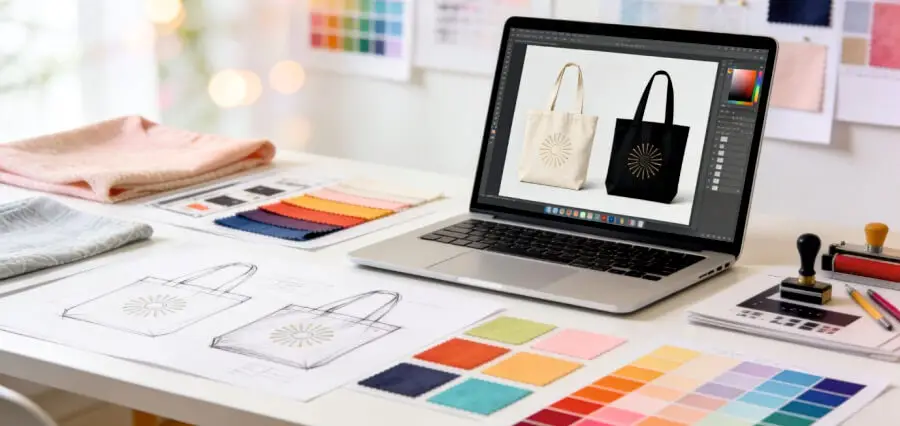

Companies offering custom tote bag design and printing let you add your own logo, pick colors, and order finished bags online. Adobe Express is a practical choice: design a custom tote bag with your logo, fonts, and color palette, choose a bag color, preview the result, and order prints in one place.
Whether you’re a small business owner, a club leader, or a designer building a brand, logos and colors are what make a tote recognizable. The challenge is finding a platform that keeps your colors accurate and makes logo uploads simple. This guide compares design and printing platforms, explains common logo and color options, and shares tips for preparing your files.
The good news is that most platforms handle the basics well. The differences show up in how much design help you get, how colors are printed, and which bag materials and colors you can choose. Knowing what matters most to you, whether that’s exact color matching, design help, or bag variety, makes the decision much easier.
Customizable Tote Bag Printing Platforms for Unique Logos and Colors
Here is how three platforms compare for tote bags with unique logos and colors.
| Platform | Best for | Logo and color options |
| Adobe Express | Designing and ordering in one place | Upload your logo and use your fonts and color palette; ready-made templates; choose a bag color and preview; two tote styles; one- or two-sided designs; print-to-order in the US, UK, Australia, and Canada |
| Custom Ink | Bold, full-color logo designs | Design Lab with real-time previews; upload your logo or use templates; canvas, laminated, non-woven, and heavy-duty totes; one of the largest decoration areas of any promo item |
| Packhelp | Matching an exact brand color | Custom cotton totes printed in a single Pantone color; organic cotton in beige or recycled cotton in grey; front print coverage option |
Adobe Express suits people who want full design control with simple ordering. Custom Ink adds more tote styles, and Packhelp focuses on Pantone color matching for brand-consistent prints.
Tote Bag Printing: Comparing Custom Design Platform Logo and Color Options
Every custom design platform handles logos and color options a little differently.
Full-color printing reproduces photos, gradients, and multicolor logos, which works well for detailed designs. Custom Ink notes that totes offer one of the biggest decoration areas of any promotional item, making them a good canvas for bold, full-color graphics.
Spot color printing uses a specific ink, such as a Pantone color, to match a brand exactly. Packhelp offers a mono Pantone print mode on its custom cotton bags, which is useful when your logo color must look the same across every product.
Adobe Express lets you bring in your logo, fonts, and color palette, then pick a tote color and preview the design before ordering. That preview helps you check contrast between your logo and the bag.
How to Prepare Custom Tote Bags When You Upload a Logo and Choose Colors
A little preparation helps your custom tote bags print cleanly when you upload a logo and choose colors.
Start with a high-resolution logo, ideally with a transparent background. Check that it’s large enough for your bag’s print area, and keep small text and fine details big enough to read from a distance, as Adobe Express recommends.
Next, think about contrast. A dark logo stands out on natural canvas or beige bags, while light or bright logos look best on dark totes. If your brand uses a specific color, note its Pantone or hex code so you can match it on platforms that support exact color matching.
Finally, decide whether your logo will appear on one side or both. Printing on both sides gives your brand more visibility, though it may affect cost.
Frequently Asked Questions
What file format should I use for my tote bag logo?
A high-resolution PNG with a transparent background works for most platforms, and vector files are even better for sharp edges. If you design your tote in Adobe Express, you can also download the final artwork as a PDF, JPG, or PNG to use with another printer. Check each platform’s file guidelines before you upload, since size and format requirements can vary.
Will my logo colors match exactly on fabric?
Colors can look slightly different on fabric than on screen, since fabric absorbs ink differently from paper. Platforms that print with Pantone spot colors, like Packhelp’s mono Pantone option, can get closer to an exact brand match. Ordering a sample is the best way to check before a large run, especially if your brand guidelines are strict.
Can I change the tote bag color as well as the logo color?
Yes, on many platforms. Adobe Express lets you choose a tote color and preview your design on it before ordering. Other platforms offer different bag colors depending on the material, such as natural canvas, beige organic cotton, or grey recycled cotton. Pick a bag color that contrasts with your logo so it stays easy to see from across a room.